
I’ve been using Alibaba Cloud servers for about a month now, and overall I’m quite satisfied~~~
It’s just that when I initially chose the configuration, I opted for 512MB of RAM. Since MySQL 5.6 is very resource-intensive,
it was killed by the system several times due to insufficient memory because it topped the memory usage list…
So, there were two solutions: one was to upgrade to 1GB of RAM, and the other was to use a third-party database service.
Originally, I went with the first option, paying an extra 20 yuan per month to upgrade to 1GB of RAM, and indeed, no more out-of-memory issues occurred.
In the spirit of tinkering, after a quiet month, I decided to try the second method~~~
This third-party database service is another offering from Alibaba Cloud called RDS (Relational Database Service).
You can choose either MySQL or SQL Server. The minimum configuration includes 5GB of storage and 240MB of RAM, currently available at a promotional price of just 5 yuan per month.
Features include: ready-to-use, stable and reliable, elastically scalable online database services. It offers multiple security protection measures and a comprehensive performance monitoring system.
Additionally, each RDS instance has two physical nodes for master-slave hot standby; if the master node fails, it switches to the standby node within seconds.
External network traffic is billed by usage, while internal network traffic is free. Therefore, by selecting the Hangzhou node—the same as my cloud server—I can use it without incurring any traffic fees~~
For details, please refer here:http://www.aliyun.com/product/rds
Relatively speaking, whether in terms of security, stability, or speed, it far surpasses hosting a database service on your own server.
Plus, it’s much cheaper than adding 512MB of RAM~~~ So I decisively gave it a try.
After payment, it was activated instantly, and then I could proceed with the database migration. First, I created a new database with the same name as the original one.
A native migration tool is provided; simply follow the instructions to set permissions and fill in the relevant information, and you can migrate with a single click.
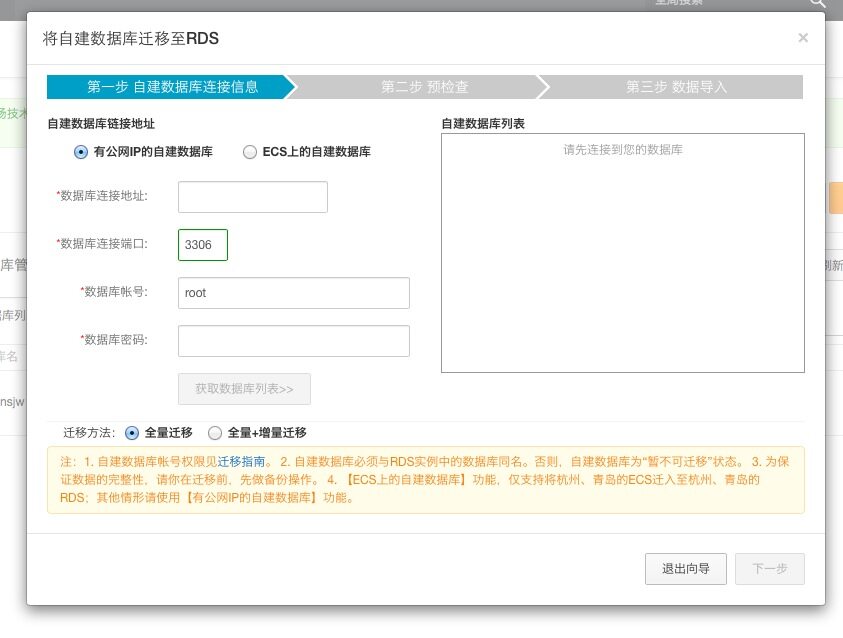
However, it only supports MySQL versions 5.1 and 5.5. Since I was using 5.6, I had to use mysqldump to export the database first,
and then use mysql to import it into the remote database. The process is relatively simple, and the official website provides detailed documentation.
Once everything was ready, I just updated the database parameters in the website backend, and that was it. At the same time, I shut down MySQL on my own server.
Memory usage instantly dropped from 50%-60% to less than 30%, and after a restart, it was even down to 18%… Indeed, 512MB of RAM is sufficient.

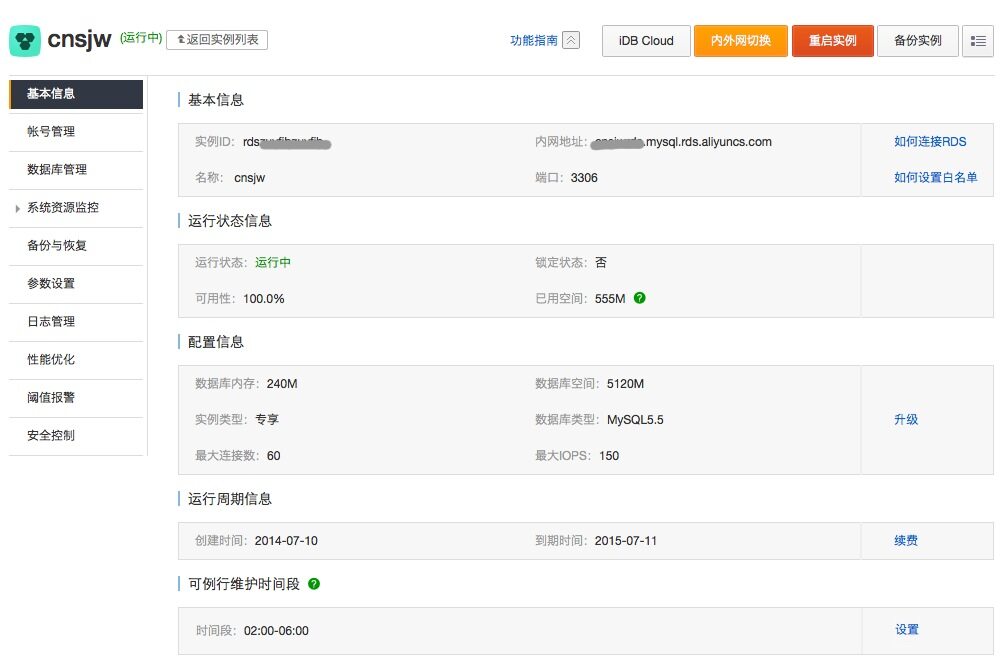
The RDS management console allows you to manage users and databases, as well as monitor various metrics,
view logs, configure automatic backups, set threshold alarms, optimize performance, configure whitelists, etc.
This means WordPress no longer needs to handle database backup tasks~~
As for managing database content, besides the built-in iDB Cloud, phpMyAdmin can also be used.
Now let’s talk about the CDN service.
When customizing the server, I noticed the bandwidth was only 1Mbps and wondered why it was so small, so I spent 20 yuan to upgrade to 2Mbps bandwidth..
As it turned out, when accessing a large number of images, even 2Mbps bandwidth still felt slow, whereas for code and other parts, 1Mbps bandwidth wasn’t fully utilized at all.
So I started considering how to accelerate static files. The first method that came to mind was CDN (Content Delivery Network).
CDN distributes origin site content to nodes across the country, reducing latency for users accessing objects,
improving website response speed and availability, and solving problems such as low network bandwidth, high user traffic, and uneven node distribution.
Alibaba Cloud also provides this service.
Refer here:http://www.aliyun.com/product/cdn
Alibaba Cloud CDN has 44 nodes nationwide, covering Unicom, Telecom, Mobile, Great Wall, etc., and 5 international nodes, with 10Gbps bandwidth per node.
It charges by traffic volume with no activation fee. Traffic costs are quite affordable at 0.4 yuan per GB.
Based on my previous server records, my website uses only about 10-20GB of traffic per month, costing just 4-8 yuan.
This allows for high-speed access from various locations. The trial results were extremely satisfying—more effective and cheaper than purchasing an additional 1Mbps of bandwidth.
Now let’s discuss specific CDN settings. First, CDNs cannot run dynamic files nor accelerate them.
Therefore, the first step is to separate dynamic and static content: move files requiring acceleration to a dedicated folder and set up a subdomain.
For my website, the main files needing acceleration are photos, so I moved all photos to a new folder
and configured the subdomain cdn.cnsjw.cn to make it accessible first.
Add this domain and the corresponding server IP address in the CDN console. After verifying the domain validity,
the system will cache and distribute files from the server. Although this takes some time, in practice, it is quite fast.
Especially when uploading new files, CDN acceleration is almost instantaneous…
For WordPress, there are mainly three steps required:
1. First, update the URLs of all image files in posts. This is easy: go directly to phpMyAdmin
and replace www.cnsjw.cn/wp-content/uploads/ with cdn.cnsjw.cn/uploads/ in the database.
After modification, you can see that all images are accessible.
2. Modify the Media upload directory and access URL.
WordPress provides these setting parameters but doesn’t expose them directly. You need to visit /wp-admin/options.php first,
then search for these two parameters: upload_path and upload_url_path, and fill in the corresponding data as shown below.
This should allow all files in the media library to be accessed via CDN, and uploads will go directly to the static folder for immediate acceleration.
After modification, this option will appear in Media settings:

3. Finally, considering previous image URLs might have been reposted by third parties or indexed by search engines,
set up a redirect so third parties can still display them and inform search engines of the new location.
Simply add the following to .htaccess
RewriteCond %{REQUEST_URI} ^/wp-content/uploads/
RewriteRule /wp-content/uploads/(.*) https://img.cnsjw.cn/$1 [R=permanent,L]
Lastly, let’s discuss Alibaba Cloud CDN billing. The billing cycle is hourly, settled every hour. Because my website traffic is relatively low,
settlements often amount to less than 1 cent. Each bill is accurate to two decimal places, with the third digit discarded directly.
Thus, if traffic within an hour is less than 25MB, that hour is free.
Although done in the spirit of tinkering, the results far exceeded expectations. I learned a lot,
and server specs could be lowered, saving 30 yuan per month… plus speeds improved.
Thanks to Alibaba Cloud for allowing small webmasters like us to enjoy such premium services.. Hahaha~~~

Support



Read this article on WeChat