
Here is another technical blog post, following up onUsing Alibaba Cloud CDN and RDS servicesandOptimizing website access speed, there was still room for improvement, so I continued tinkering to further accelerate the website.
First up isUsing Alibaba Cloud OSS service:
Since this site has many images, each page now requires loading about 2-4MB of data. However, the server only has a meager 2M bandwidth. Even with just one user accessing the site at full speed, it takes 8-16 seconds to load a single page, which is completely unacceptable. Even when using a CDN, when a user accesses a file from a new node that hasn’t cached it yet, the data must still be fetched from the ECS instance. In this scenario, the 2M bandwidth becomes a severe bottleneck. Therefore, using OSS is an excellent choice; Alibaba Cloud OSS egress uses BGP multi-line routing and has no bandwidth limits.
Alibaba Cloud OSS pricing is very affordable, consisting of three parts:
- Storage: For under 50TB, it costs 0.0058 yuan/GB per day or 0.00024 yuan/GB per hour. Since Alibaba Cloud bills hourly and rounds down (truncates), with a minimum unit of 0.01 yuan, charges only begin once usage reaches 45GB (costing 1 cent per hour). Anything below that is free.
- Traffic: From 8:00 AM to midnight, it is 0.75 yuan/GB. This equates to roughly 0.0007 yuan/MB, meaning you are charged 1 cent for every ~14MB of traffic within an hour; anything under 14MB is free. Rates are half-price from midnight to 8:00 AM.
- Requests: 0.01 yuan per 10,000 requests. Similarly, fewer than 10,000 requests within an hour are free.
For my website, which only stores a little over 1GB and receives only a few hundred requests per hour, only traffic is likely to incur charges. CDN traffic costs are half that of OSS, making the combination of OSS + CDN a great choice for both speed and affordability. This way, OSS is only billed when a user requests a file not cached on the CDN node. Once the CDN node caches the file, only CDN fees apply, and no OSS traffic is consumed.
In fact, I started using OSS + CDN over a month ago. In practice, the cost hasn’t changed much compared to using CDN alone. Thus, the ultimate solution is actually Cloud Server ECS + Relational Database RDS + Object Storage OSS + CDN. Of course, if traffic increases further, multiple ECS instances can be used for load balancing.
Now let’s talk about the actual implementation. Migrating data to OSS isn’t exactly easy. First is activation, which is simple:
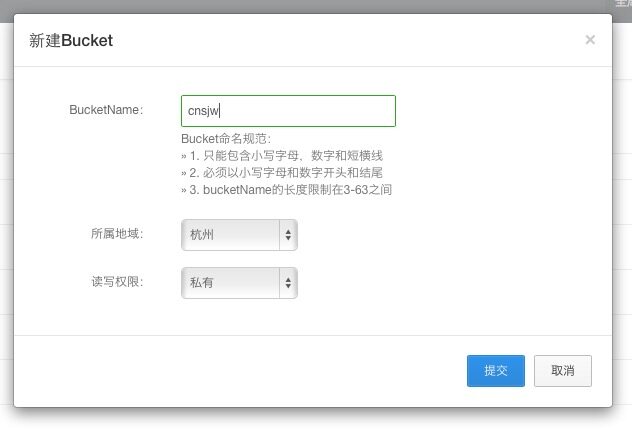
Create a new bucket:
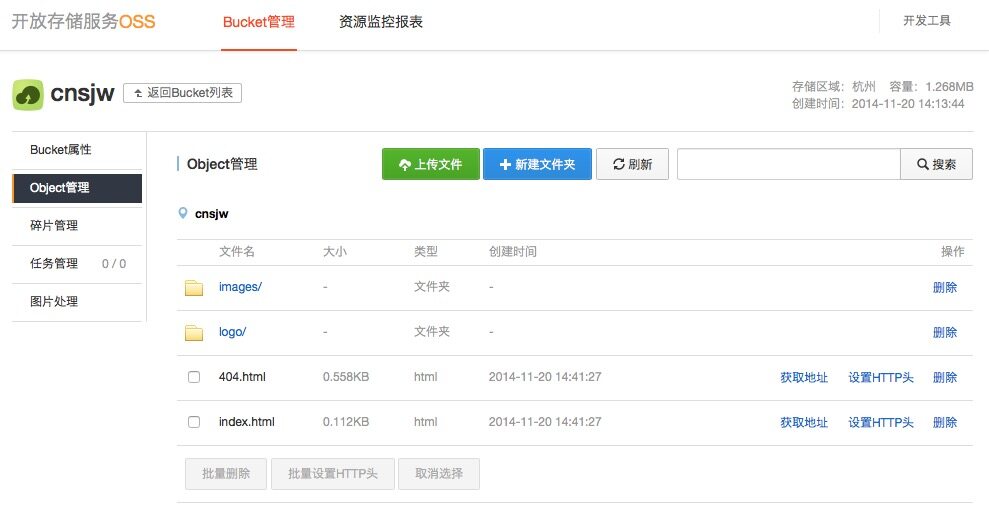
Basic operations like uploading and deleting files can be performed in Object Management:
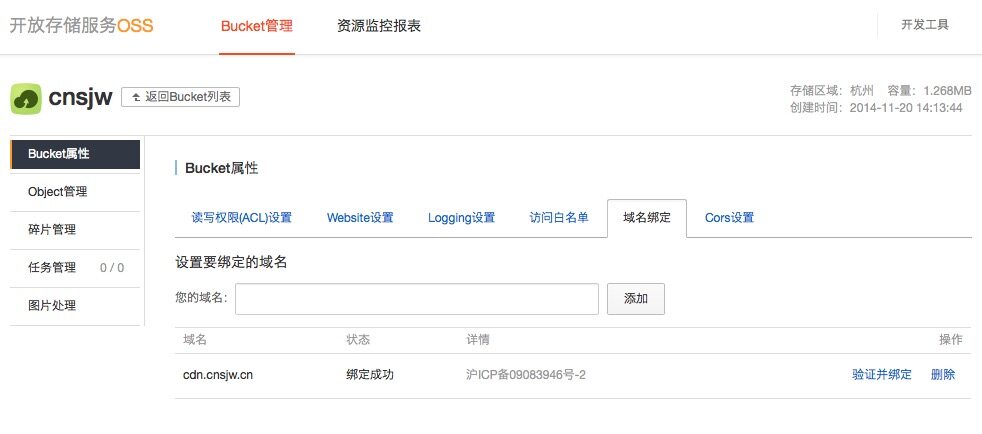
You can bind your own domain name in Settings according to the instructions:
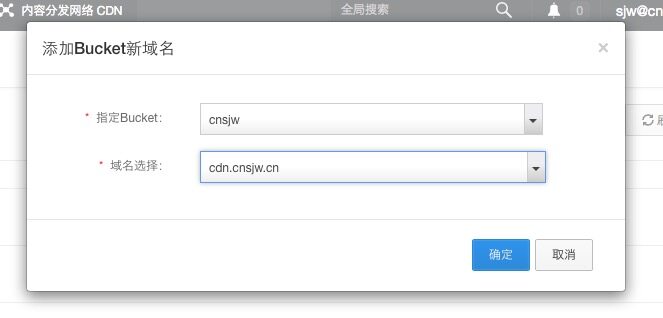
Then, in the CDN settings, create a new domain sourced from the bucket

Select the bucket and domain you want to use with the CDN. After a brief wait, you will receive a CNAME record. Configure it in your domain registrar’s backend to start using it.
The next step is to move all images from this site to OSS, which is definitely not an easy task. There are numerous files with complex directory structures, and OSS lacks an upload tool similar to FTP. Later, I found a tool calledOSSExplore, which enables FTP-like OSS management on Windows, allowing folder-based uploads at least. Although it was quite buggy in actual use, I managed to upload the images. Then came finding and replacing image URLs in the database, which was relatively simple.
Alibaba Cloud WordPress Plugin
Files uploaded via the WordPress backend need to be sent directly to OSS, and access URLs must be updated accordingly. This requires a specific plugin. Honestly, this was the hardest thing to find. Everything available online was either unavailable for download or outdated. After searching high and low, I couldn’t find a single truly functional one…
Eventually, I foundAliyun OSS Support. It had been updated relatively recently. I found a few bugs and contacted the author,Ivan Chou, who resolved them smoothly. So, I recommend this plugin here. Deleting files also removes them from OSS, and you can choose to keep a local backup while uploading to OSS. It is currently the only WordPress plugin that supports OSS reasonably well, although there is still room for improvement. Many thanks to the author for their efforts, and I hope it continues to improve in the future.
Reducing Plugins
Everyone knows WordPress is famous for its diverse and convenient plugins, but they come with many issues, especially version compatibility and the inclusion of multiple JS/CSS files, which significantly increases request counts. If a referenced file is hosted outside the Great Firewall, it causes even more trouble. I tried plugins like Minify to combine JS/CSS, but they didn’t help much.
Therefore, avoid using plugins for problems that can be solved otherwise. Many features can be implemented via code in the theme’s functions.php file. Examples include replacing Google Fonts URLs, sending email notifications for comment replies, disabling the built-in jQuery, and configuring search to exclude pages.
Previously, I used sharing plugins like AddThis, then switched to JiaThis after it was blocked. Later, I realized sharing via Weibo and WeChat was sufficient, so I switched to Weibo’s native share button, which even displays my site as the source~~~ I also modified Fancyzoom to serve all requested resources via CDN.
After streamlining, I now use only these plugins, most of which are for backend use and do not load on the frontend at all:
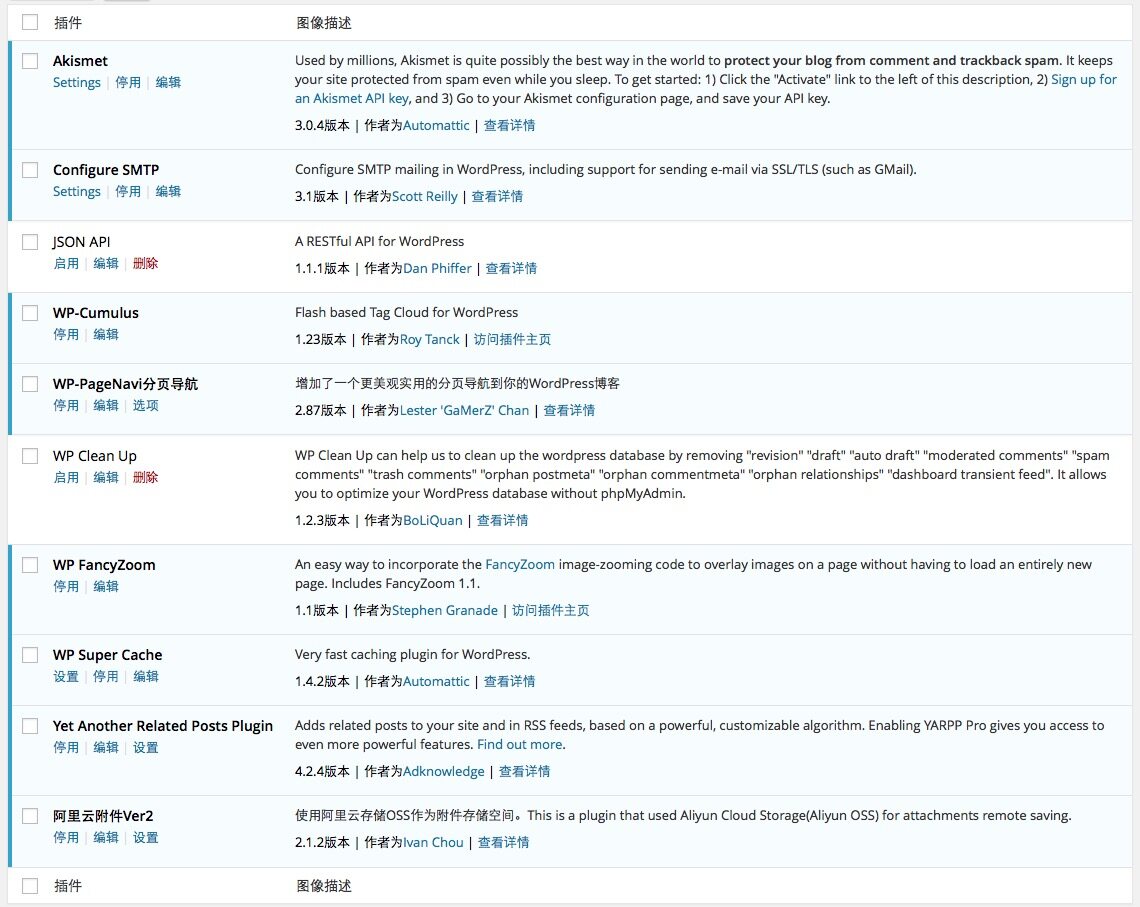
WP Super Cache
This primarily addresses the issue of long Time to First Byte (TTFB). Whether due to excessive data calls on my homepage or other reasons, TTFB consistently hovered between 300-500ms, which is quite long. Since this site doesn’t have much interactive content and articles rarely change after publication, complete static caching is an excellent solution.
The WP Super Cache plugin does exactly this. Via URL rewriting, pages that originally required dynamic generation are generated only once and cached. Subsequent visitors access the cached static page directly, significantly improving TTFB. It also supports moving static files from wp-includes and wp-content folders to a CDN, a feature enabled on this site as well.
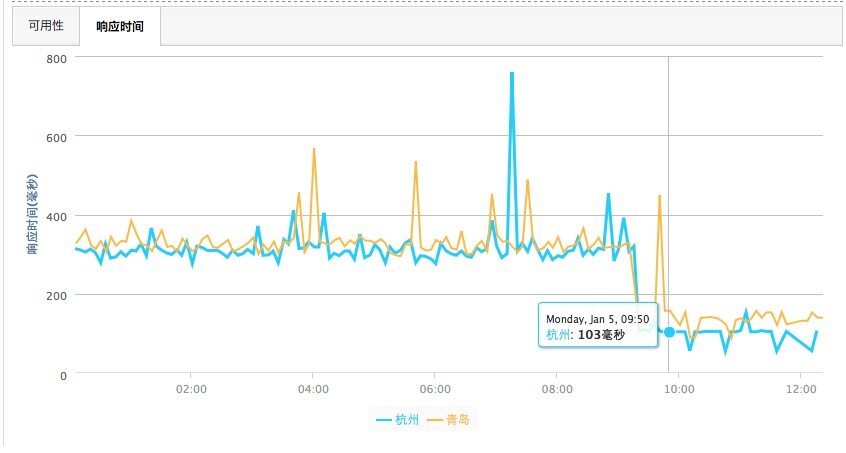
After optimization, TTFB is now generally under 100ms, often measuring between 20-50ms in tests—a significant improvement. Total page load time has also improved from the previous 1-2 seconds to 0.5-1 second (for non-first visits). First visit times are heavily influenced by the user’s bandwidth. Achieving sub-second loads typically requires at least a 20Mbps connection, and I’ve recently realized that most regions in the country don’t actually reach these speeds…

Support



Read this article on WeChat