
I’ve been thinking about migrating the site to WordPress for a long time, and I finally completed it at home during the 2011 Spring Festival. If you have subscribed to this site, please update your subscription address. The new address iswww.cnsjw.cn/feed
Of course,the old versionis still accessible. Since I won’t be importing the approximately 450 posts from the old site to the new one, the old website will be kept online for at least another year.
Feel free to leave a comment; just fill in your username and email. First-time comments require my approval, but subsequent ones will not. WordPress comment avatars are provided by Gravatar, so if you update your avatar ongravatar.com, it will be displayed across all WordPress sites.
Have been thinking of a WordPress site for a long time, it’s finally done during the Spring Festival vacation at Changchun. Please renew your subscription of this site, the new address is www.cnsjw.cn/feed
The old version will remain online for at least a year.
To leave a comment is easy, just fill in your username and email. The comment needs to be approved for the first time. Future comments will be shown immediately. The avatar of WordPress is provided by Gravatar, go to gravatar.com to get an avatar for your email. It will be used on all wordpress sites.
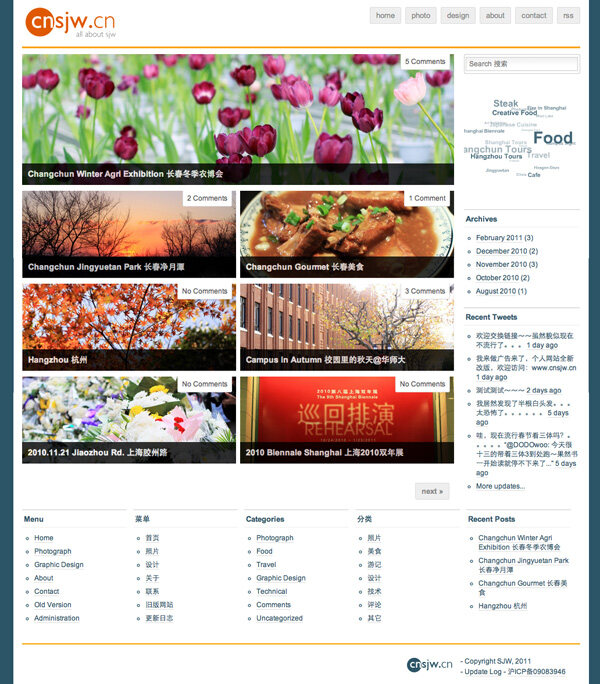
Here are some thoughts on WordPress:
WordPress has become increasingly popular recently, evolving from a simple blogging system into a CMS. This is my first time really diving into WordPress; I analyzed the code of several themes and gained a general understanding of its structure and functionality implementation. Almost everything in WordPress can be controlled by themes—what to display, how much to display, and how to display it. Therefore, various functions can be achieved through themes and plugins without touching the core code.
A major feature of WordPress is its vast array of free plugins, which can meet almost any need. However, due to the sheer number available, there are many duplicates; some are powerful, while others may cause issues. So, it’s definitely worth reading other users’ reviews.
Below is a summary of the plugins I am using:
- Akismet
nThe official anti-spam comment plugin. - cbnet Different Posts Per Page
Allows you to set different numbers of posts to display on the homepage, category pages, etc. I use this because I only display large images on the homepage and not on other pages, so the post counts differ. It even allows separate settings for homepage pagination beyond the first page~~ - CoCo Linksort
A very simple plugin that lets you set the sorting method for Links. I currently have it set to sort by date added. - Disable Revisions
Disables the Revisions feature (WordPress version control). Since it saves a copy every time you save a draft, over time this creates many useless copies, especially for someone like me who saves drafts frequently… - Highlight Source Pro
Used for syntax highlighting code blocks; an essential tool for technical articles~~~~ - Recommended Reading: Google Reader Shared
Displays shared items from Google Reader. You can see the effect in the sidebar and contact section of this site under ‘Google reader shared items’. It can display not just titles but also more detailed snippets, sharing timestamps, and notes. - ReplyMe
Sends a notification email to the parent commenter when you reply to their comment. - Twitter Tools
This is a very powerful Twitter plugin. I’m only using its most basic features: a ‘Recent Tweets’ widget in the homepage sidebar (configured to hide replies) and auto-posting to Twitter when a new blog post is published. It has other features too, such as compiling daily tweets into a blog post or tweeting directly from the dashboard, which will show ‘via cnsjw.cn’. - WordPress Database Backup
Backs up the database, including custom tables from other plugins. Backups can be downloaded locally, saved on the server, or scheduled to be sent via email. - WordPress Related Posts
Displays related posts based on tags; if none are found, it shows random posts. I’ve placed it at the bottom of articles and in the sidebar. It can also be configured to include related posts in the RSS feed. - WP-Cumulus
A very popular alternative to standard tag clouds. It uses Flash to display all tags as a 3D sphere. It looks much better than the original plain-text tag cloud, and the more tags you have, the more spherical it becomes. Slowly accumulating tags now~~~ See the effect on the right. - WP-Mail-SMTP
For some reason, the server cannot send emails using the mail() function, possibly due to component configuration issues. Too lazy to troubleshoot, I used this plugin instead. By configuring an SMTP server, all WordPress email-sending functions are routed through SMTP.
WordPress offers very useful Widgets, including Links, Recent Comments, Recent Posts, Custom Menu, Text, Calendar, and other common features. You simply drag the ones you need into the Sidebars via the dashboard.
For example, the internal function links at the bottom of this site are all implemented using Custom Menus; I used four of them for the Chinese/English menus and categories respectively.
WordPress plugins generally provide three ways to integrate them:
The simplest is via Widgets, which you can drag directly into the Sidebar. Alternatively, you can add call code within the theme’s sidebar.php file. There is also the shortcode method for inserting content directly into posts, using[shortcode]to invoke the plugin directly within the post content. Refer to the specific plugin’s documentation for details.
WordPress is an excellent system. If you want to build your own blog or website, consider giving WordPress a try.


Support