
This article isn’t meant to tell everyone how to manage their email, but simply to share my own experience. For various reasons, I have accumulated a great many email addresses, so I decided it was time to organize them properly.
1. History
Once upon a time, about 10 years ago, back in the era when everyone bought internet cards for dial-up access, the first services to develop were free email, static free website hosting, and various ad-supported free second- and third-level domain services. Because internet speeds at the time made services like downloads or video streaming unfeasible—streaming media was basically only being developed by RealNetworks and Microsoft, and the quality was far worse than VCD—progress in these areas was slow due to numerous objective limitations.
Of course, back then mailboxes only offered 5MB or 10MB of storage, and web space was also limited to 10MB. Over the next few years, development progressed slowly. Later, capacities grew to 50MB and 100MB. At that time, almost all domestic free email services appended an advertisement to every email, and the mailbox interfaces were filled with ads. Then paid email services emerged; the main differences from free services were no ads and slightly larger storage capacity. During this period, I registered many free mailboxes, including Sina, 263, 163, Yeah, and 126.
To collect emails from multiple accounts simultaneously, I started using Foxmail and later switched to Outlook. This became a serious issue when reinstalling the operating system or changing computers, often resulting in lost emails. Typically, when giving out my email address, I would only use one specific account, generally sticking to the same one each time. Gradually, some of my mailboxes stopped containing any useful messages and became filled with spam.
2. Evolution
In 2005, I registered my own domain, cnsjw.cn, and used the free enterprise email provided by the registrar. Although it only had 50MB of total space, it was the first time I owned an email address under my own unique domain. This is also when I started using the address sjw@cnsjw.cn.
From then on, whether registering for websites or sharing my contact information, I always used this address. However, due to the limited storage, I still had to use Outlook daily to download emails locally, while also fetching mail from my other accounts.
After a few years, this became my primary mailbox, while the others gradually ceased to contain any meaningful correspondence. But at the time, those secondary accounts still served a purpose: usually, if I were sending an email to someone, I would prioritize using the mailbox matching the recipient’s provider. For example, I would use my Sina mailbox to send emails to @sina.com addresses, believing at the time that this ensured faster delivery and prevented loss.
With the continuous development of Gmail, email entered an entirely new era: AJAX, labels, anti-spam measures, conversation view… The widespread adoption of broadband and rapidly expanding storage capacities made downloading emails from servers to local machines redundant. Online mailboxes could not only replicate all of Outlook’s features but often performed them even better.
Domestic email service providers gradually followed suit, launching high-capacity, ad-free email services.
3. Current Status
It wasn’t until 2010, when I started using an Android phone, that I revived my long-forgotten Gmail account. In 2010, my email situation was quite chaotic: I had sjw@cnsjw.cn, MSN Hotmail, Gmail (with GTalk), QQ Mail, plus a bunch of other accounts stored in Outlook…
During the Spring Festival visit home this year, taking advantage of a blog platform migration—and because I could no longer tolerate the endless spam in my primary inbox or the necessity of using Outlook—I researched free custom domain email services offered by major providers like NetEase, Gmail, and QQ. My first thought was naturally Gmail, but unfortunately, it doesn’t support .cn domains… so I had to give up on that.
I then turned to QQ Domain Mail. Previously, I knew nothing about QQ Mail and assumed it was just like any ordinary domestic email service. Only after starting to use it did I discover its key feature: user identification is based on QQ accounts. For instance, a@abc.com and b@abc.com would be two completely separate, independent accounts on other domain mail platforms, but with QQ Domain Mail, they can both be linked to the same QQ number, allowing unified management and sending/receiving across all bound addresses. Moreover, each individual address can have its own sender name and signature configured independently, making switching between them very convenient.
Functionally, QQ Mail offers conversation view, convenient labeling, drag-and-drop file attachment (a feature Gmail actually adopted from QQ Mail), dragging emails into folders or labels, and even right-click context menus. Storage is unlimited (automatically doubling once you reach half capacity). You can set various incoming mail rules, send attachments up to 1GB, enjoy fast domestic access without censorship risks, full HTTPS support, and reasonably convenient mobile access. Important emails can trigger SMS notifications upon receiving replies. It’s ad-free, allows logo customization, supports POP3/SMTP/IMAP protocols, and permits setting independent passwords.
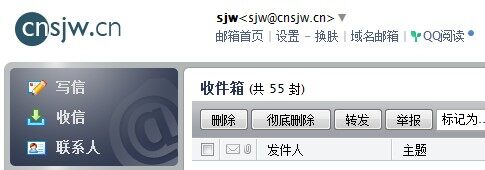
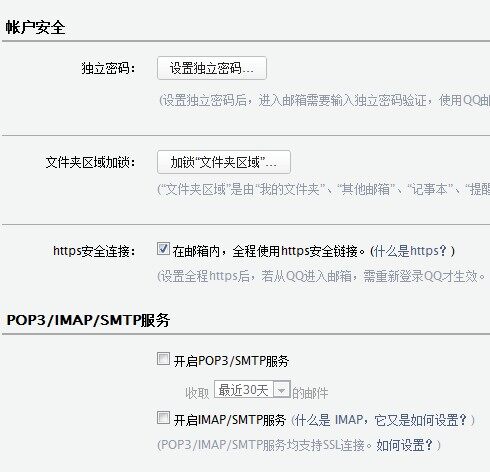
Having used it for two months now, I’m extremely satisfied with QQ Mail.
So here is my current email setup:
Gmail has the highest priority; since incoming emails trigger real-time notifications on my phone, I don’t use it publicly—it’s reserved solely for close contacts. My primary mailbox sjw@cnsjw.cn and work mailbox sjw@eitdesign.com are both bound to my main QQ account.
The notification email address for my BLOG, feedback@cnsjw.cn, along with the contact page email feedback@eitdesign.com, are bound to another QQ account I haven’t actively used in years. SMTP service is enabled on this account exclusively for sending automated emails via my websites. To protect my QQ password security, I’ve set up an independent mailbox password. To prevent accidental replies to these addresses, I’ve configured automatic forwarding of all incoming messages to my primary mailbox. Within my primary mailbox, emails forwarded from these two accounts are automatically sorted into dedicated folders.
I no longer use MSN or Hotmail.
I no longer use any of the various free email accounts I previously registered.
4. Future Outlook
This section may not be directly relevant to me personally, but what I want to say is this: I believe everyone should own their own domain name, enabling highly personalized URLs and email addresses.
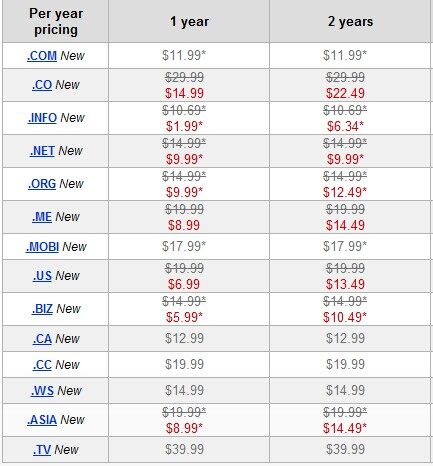
Firstly, domains are very affordable—typically costing just $6–$12 per year, with .info domains available for as little as $1.99. Individuals might also consider registering a .me domain. Furthermore, there’s absolutely no need to rent hosting space or servers—you can simply use your domain for email services and subdomain redirection.
For example, your personal email could be i@yourname.com or me@yourname.com.
Your Weibo profile could be weibo.yourname.com, your Facebook fb.yourname.com,
and your BLOG blog.yourname.com. If your university provides personal resume pages,
you could point your main domain www.yourname.com directly to your resume—giving potential employers a pleasant little surprise during job hunting.
Plus, printing such an address on business cards is surely much more interesting than generic addresses like @qq.com, @sina.com, or @163.com~~~

Support