
1. What is Aliasing?
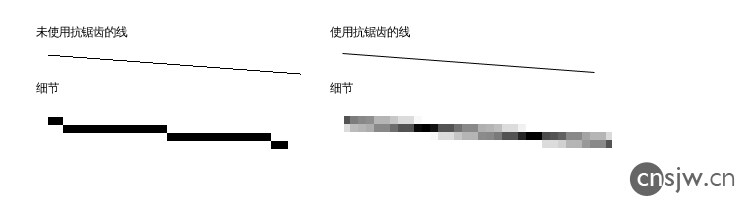
On displays, because the resolution is far lower than that of print media, and pixels are arranged in a square grid, non-straight edges exhibit noticeable jaggedness (aliasing). The most basic anti-aliasing method is resampling, which fills edge pixels with intermediate tones. As shown below, the line on the left displays obvious aliasing, while the line on the right appears much smoother.
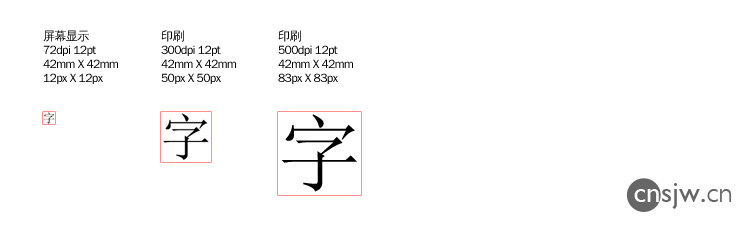
Looking at the image below, typical print resolution ranges from 300–500 DPI, whereas displays usually offer only 70–100 DPI. Consequently, text of the same size can only be rendered using far fewer dots on screen. For example, a 12pt Chinese character (equivalent to “Xiao Si” size in Word) looks reasonably large and crisp when printed. However, on screen, the same character must be represented within a mere 12×12 pixel grid, making clear rendering a significant challenge.
2. The Rise of LCD Displays
In the era of CRT monitors, both Windows and macOS addressed this issue using bitmap fonts. Essentially, instead of applying anti-aliasing, the system stored dedicated bitmaps for commonly used font sizes (e.g., 12pt, 14pt, 16pt). This approach had obvious drawbacks: larger text appeared terribly jagged, while smaller text became completely illegible. Moreover, only specially prepared bitmap fonts could be used; other fonts looked awful:

This problem became especially pronounced on LCD screens, where each dot corresponds exactly to one pixel, leading users to increasingly reject such heavily aliased text. Text anti-aliasing technologies were subsequently introduced, with both macOS X and Windows Vista implementing their own LCD-specific subpixel rendering techniques.
LCD screens have a unique characteristic: each pixel consists of horizontally arranged red, green, and blue subpixels. By controlling these three subpixels individually through color manipulation, precise rendering becomes possible.
The images below show, from left to right: native 1:1 display, 8× magnification, and a localized 32× zoom. The middle image represents the color signal sent to the display, while the rightmost image shows the actual output on screen. Clearly, there’s a significant difference between grayscale-only rendering and individual subpixel control, particularly for complex strokes. With separate subpixel control, black text on a white background can clearly render a stroke using only 1/3 to 2/3 of a pixel.
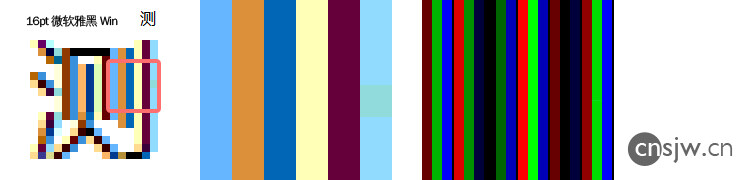
By contrast, grayscale-only rendering requires an entire pixel to produce a crisp black stroke:
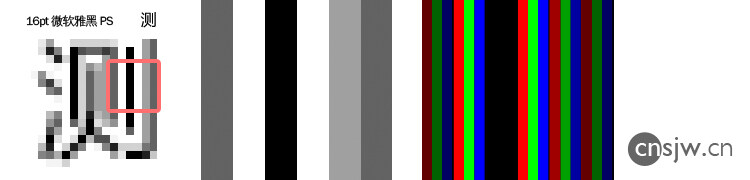
It is precisely this feature that enables more precise control over text aliasing. Of course, screens composed entirely of monochrome LEDs—such as those found in subway cars—can only use bitmap fonts and cannot employ any form of anti-aliasing.
3. Comparative Testing
Both Windows and macOS utilize the aforementioned precise subpixel color control for anti-aliasing.
Our tests employed four system fonts at 12px, 14px, and 16px sizes:
Simplified Chinese system fonts for Win98/XP: SimSun (Songti); Simplified Chinese system fonts for Vista/7: Microsoft YaHei
Traditional Chinese system fonts for Win98/XP: PMingLiU (MingLiU); Traditional Chinese system fonts for Vista/7: Microsoft JhengHei
At 12px, we observe that Windows continues to apply legacy rendering methods to older OS fonts—retaining the painstakingly crafted bitmap glyphs originally designed for them, without any anti-aliasing whatsoever. Meanwhile, macOS performs exceptionally well in anti-aliasing, maintaining clarity even at such small sizes.
Without anti-aliasing, characters require at least a one-pixel gap between them to prevent merging, effectively leaving only an 11×12 pixel area. To avoid excessive vertical elongation, Microsoft allocated just an 11×11 pixel space for MingLiU. Bitmap fonts face severe limitations with complex characters—they become nearly illegible unless simplified drastically.
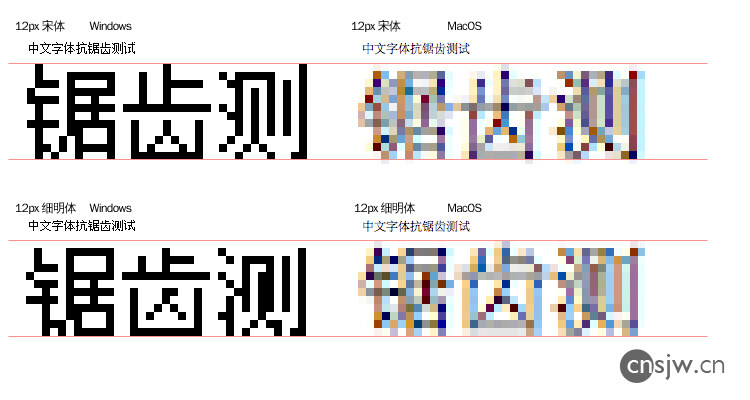
Microsoft specifically optimized its newer-generation Windows system fonts for ClearType. At smaller sizes, rather than relying solely on generic anti-aliasing algorithms, each glyph has been individually fine-tuned and embedded into the font file itself. These optimizations are readable and renderable exclusively via ClearType. Reportedly, Microsoft invested around $200 per character in this optimization process. The benefits are evident: under Windows, these two fonts appear significantly sharper than on macOS. Curiously, however, certain characters end up one pixel shorter than others, resulting in inconsistent baseline alignment.
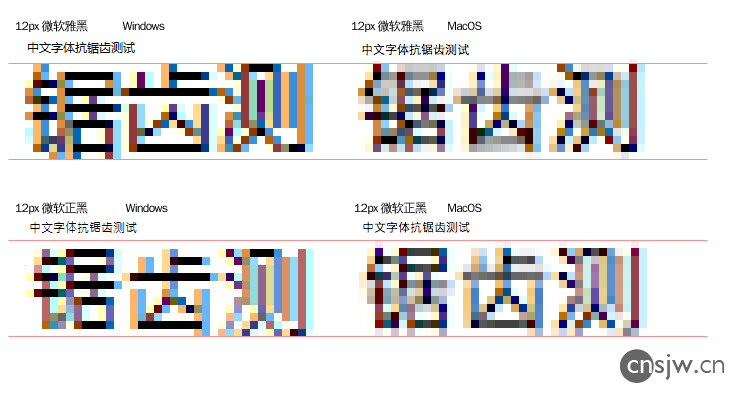
That covers the basics. There’s no need to enlarge the 14px and 16px samples,
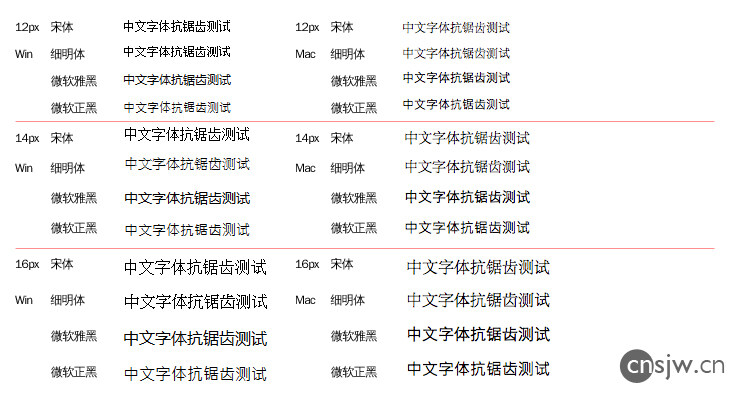
From our observations, the tested Windows fonts either rely on bitmap rendering or have been explicitly optimized for ClearType. Interestingly, PMingLiU at 14px lacks bitmap data altogether, providing us an ideal opportunity to directly compare Windows vs. macOS anti-aliasing performance. It’s immediately apparent that text rendered under Windows appears noticeably less smooth compared to macOS.
Even without special optimization, Songti and Heiti on macOS look excellent above 14px, though slight stroke merging occurs at 12px. On Windows, thanks to specialized processing, overall sharpness isn’t problematic—but uneven character heights remain an issue. Surprisingly, Windows still resorts to bitmap rendering at 16px, producing excessively visible aliasing…
Below are test results involving complex characters:
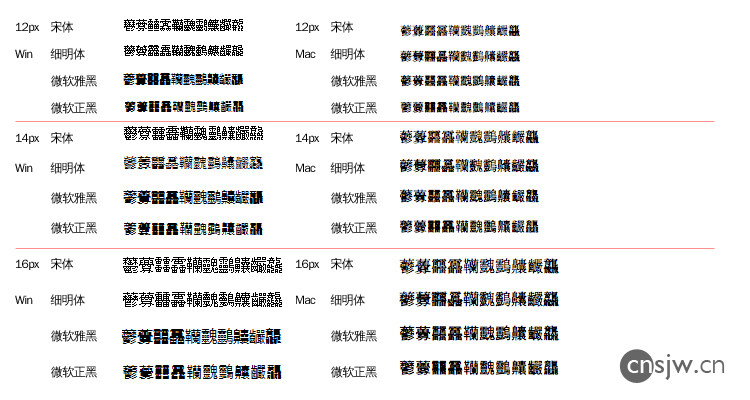
At 12px, almost all characters are unreadable; at 14px, recognition remains extremely difficult. Even at 16px, bitmap-rendered characters are so oversimplified they’re barely recognizable, whereas macOS handles them considerably better. Regarding the two Heiti-typefaces, Microsoft YaHei renders intermediate-complexity characters like “韊䰱䴒齉” quite acceptably under Windows due to specific optimizations. However, the final character “龘” fares poorly on Windows but achieves higher legibility on macOS.
4. Conclusion
Clearly, macOS has achieved an exceptionally high standard in anti-aliasing quality. Since Microsoft YaHei was tailor-made for Windows ClearType, it delivers optimal results only when paired with ClearType. Therefore, don’t mistakenly assume Microsoft YaHei will necessarily look better on macOS than on Windows.
As for unoptimized fonts, unfortunately, Windows falls considerably short compared to macOS. Although our tests revealed this disparity primarily with PMingLiU at 14px, the difference was already strikingly evident.
P.S.: Remember to view your screen from a normal viewing distance (~50 cm). Don’t scrutinize it up close and complain about unclear characters—after all, limited display resolution inevitably imposes constraints…
Finally, let’s discuss anti-aliasing on iOS:
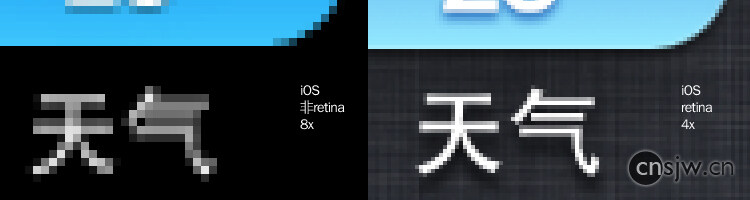
iOS does not leverage subpixel color rendering; instead, it relies purely on grayscale anti-aliasing. That explains why text on iPads or iPhones (models 1–3) often appears somewhat jagged and less smooth compared to macOS or Windows.
However, starting with iPhone 4’s Retina display—even though the same grayscale method applies—the dramatically increased resolution (326 DPI) renders aliasing virtually invisible~~~~
If images in external RSS feeds aren’t displayed at a 1:1 ratio, this article may lose effectiveness. Please refer to the original source.


Support